5 Hidden Features of the Deathadder V4 Pro You Must Know About
Category: Electronics
Introduction
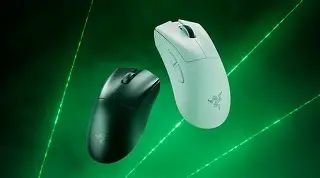
The Razer Deathadder line has been a go-to choice for gamers and power users for over a decade. The Deathadder V4 Pro continues that tradition with a familiar ergonomic silhouette, modern wireless connectivity, and a focus on sensor performance. Beyond the headline specifications — shape, DPI, and weight — there are several lesser-known features and software options that materially affect daily use. These “hidden” capabilities can improve aiming consistency, reduce in-game latency, and simplify workflows for content creators and productivity users alike.
This article explores five of those features in depth, explains why they matter in real-world scenarios, and offers practical guidance on how to take advantage of them. The goal is to help prospective buyers and current owners extract more value from the Deathadder V4 Pro, whether they play competitive shooters, work in photo editing, or simply want a more reliable day-to-day mouse.
Quick overview: what buyers typically care about
Before diving into hidden features, it helps to acknowledge common buying criteria. Most people choosing a premium wireless mouse like the Deathadder V4 Pro are thinking about:
- Ergonomics: Will the mouse fit their grip and hand size for long sessions?
- Sensor accuracy: Does it track reliably across different surfaces?
- Latency and reliability: Is wireless performance indistinguishable from wired?
- Battery life and charging: How long between charges and how fast to top up?
- Software flexibility: Can DPI, macros, and lighting be customized or stored onboard?
Understanding hidden features is about moving beyond those basic boxes and achieving tangible improvements in those areas.
The five hidden features explained
1. Onboard profiles and instant DPI switching
Many users assume customization lives only in the mouse software. While Razer Synapse provides deep control, the Deathadder V4 Pro also stores profiles directly on the mouse’s onboard memory. This means DPI stages, button mappings, and lighting settings can travel with the mouse to another PC without reconfiguring Synapse.
Why it matters: competitive players who travel to LANs or streamers who switch between machines benefit from consistent feel and performance. Onboard profiles are also helpful in workplace environments where installing vendor software is not permitted.
Real-world tip: create three DPI stages for general use — a low DPI for precision work and sniping, a mid DPI for normal aim, and a high DPI for quick desktop navigation. Assign a hardware DPI toggle to the thumb button for instant switching during play or when swapping tasks.
2. Surface calibration and sensor optimization
Optical sensors can behave differently depending on mouse pad texture and color. The Deathadder V4 Pro supports surface calibration through its companion software, allowing the sensor to tune tracking parameters to the pad in use.
Why it matters: users who switch between cloth pads, hard pads, and even desk surfaces may notice micro-jitter or inconsistencies. Calibrating the sensor reduces unintended smoothing or prediction, producing a truer one-to-one response.
Real-world tip: run the surface calibration routine whenever a new pad is introduced. For LAN events, carry a small patch of your primary pad material and recalibrate at the venue if tracking feels off.
Discover deals on Electronics — updated daily.
View Offers →3. Hypershift-style secondary actions and macro layers
Beyond simple button remapping, the Deathadder V4 Pro supports a “hold-to-shift” concept where a button acts as a modifier to unlock a secondary set of functions. This is conceptually similar to keyboard modifier keys and enables sophisticated macro layering without adding hardware buttons.
Why it matters: players can bind two weapon binds or complex macro chains to the same physical buttons depending on whether the modifier is held. Productivity users can map quick app-switching, multi-step shortcuts, or clipboard macros to the modifier layer for faster workflows.
Real-world tip: configure a thumb modifier so that a single click is the usual action, and holding the same thumb button triggers macros for complex commands (e.g., multi-key Photoshop actions or an in-game utility sequence).
4. Wireless performance modes and adaptive frequency handling
Wireless mice often allow trade-offs between maximum responsiveness and battery conservation. The Deathadder V4 Pro takes advantage of Razer’s wireless technologies to reduce interference and maintain low latency, but it also exposes settings that let users prioritize battery life or peak performance.
Why it matters: in congested wireless environments (convention centers, shared apartments), adaptive frequency handling helps keep input smooth. Conversely, when battery runtime is crucial — such as long travel days or extended work sessions — a more power-frugal mode extends uptime.
Real-world tip: keep the mouse in performance mode for competitive matches, but switch to battery saver mode during travel or long productivity sessions. If experiencing stutter at events, a quick run of the wireless diagnostic tools in software can reveal channel congestion and suggest a better USB dongle placement.
5. Lift-off distance tuning and click behavior adjustments
Two subtle but influential settings are lift-off distance (LOD) and click debounce/actuation behavior. LOD controls when the sensor stops tracking as the mouse is lifted off the surface — important for flicks and repositioning. Click behavior adjustments (debounce) let users fine-tune how the hardware interprets press/release signals to avoid accidental double-clicks or to capture ultra-fast actuations.
Why it matters: lowering LOD can reduce unwanted cursor movement during rapid repositioning in first-person shooters, while adjusting debounce eliminates accidental inputs that ruin critical moments. These options transform the mouse from merely responsive to predictably reliable.
Real-world tip: set a slightly lower LOD for low-sens FPS play and increase the debounce delay only if double-clicks are observed; too high a debounce can create perceived input lag for light-click users.
Detailed product analysis
The Deathadder V4 Pro’s ergonomic shape remains its defining strength. For users with medium-to-large hands who favor a palm or relaxed claw grip, the body offers natural support and minimizes wrist flex during extended sessions. The textured side grips help maintain control without forcing an aggressive hold.
Internally, the combination of a high-precision optical sensor and Razer’s wireless stack yields competitive-grade tracking and responsiveness when configured properly. The onboard profile storage reduces the friction of moving between systems, and the Synapse suite provides per-application profiles and lighting management for users who enjoy granular customization.
Shop the latest Electronics picks on Amazon.
See Deals →Battery life in practical terms depends on backlighting usage and polling mode. Those who turn RGB lighting off and use balanced wireless modes will see the best real-world runtimes. The USB-C charging connection is convenient for quick top-ups between sessions.
For durability, Razer’s optical switches reduce mechanical wear points relative to traditional mechanical switches. In daily use this translates to consistent click feel over longer periods; however, buyers who prioritize replaceability should verify local repair or warranty options since premium mice generally require factory servicing for internal switch replacement.
Pros & Cons
- Pros:
- Ergonomic body suited to palm and claw grips for many users
- Onboard memory allows portable profiles without software
- Surface calibration improves sensor reliability across pads
- Secondary action layers (Hypershift-style) expand functionality without extra buttons
- Wireless modes offer a useful balance between latency and battery life
- Cons:
- Some advanced settings require Synapse software which not everyone can or wants to install
- Ergonomics favor certain grip styles; users with smaller hands may find it bulky
- Onboard customization is powerful but limited by available physical buttons
- Premium price relative to simpler wired alternatives
Comparison: Deathadder V4 Pro versus similar category mice
| Feature | Deathadder V4 Pro | Typical Lightweight Wireless Rival | Ergonomic Wired Alternative |
|---|---|---|---|
| Ergonomics | Large, palm-friendly shape | Compact, ambidextrous or near-ambidextrous | Often similarly ergonomic but tethered |
| Sensor & Tracking | High-precision optical sensor with surface tuning | High-end sensor focused on minimal weight | High-precision with stable wired connection |
| Wireless | Low-latency wireless with adaptive modes | Emphasizes minimal weight, sometimes sacrifices battery | Wired (no wireless) |
| Onboard Profiles | Yes — profile storage for portability | Some have limited onboard memory | Often limited or none |
| Best for | Ergonomic gaming, long sessions, mixed use | Competitive players prioritizing minimal mass | Users preferring absolute wired reliability |
Buying guide: how to decide if the Deathadder V4 Pro is right
Choosing the right mouse depends on use case. The Deathadder V4 Pro is a strong candidate for many buyers, but it’s helpful to walk through the specific considerations.
Grip style and hand size
Measure your hand (length and width) and compare to manufacturer dimensions where available. The V4 Pro’s sculpted, elongated body is particularly friendly to palm and relaxed claw grips. Fingertip users or those with very small hands should test ergonomics in person or compare to smaller ambidextrous models.
Primary tasks
- Competitive FPS: prioritize low LOD, performance wireless mode, and a sensor with reliable one-to-one tracking. The Deathadder V4 Pro supports those settings but be sure to test environment-specific wireless stability.
- MOBA/MMO: look at macro layers and Hypershift-like modifier functionality. The V4 Pro’s secondary action capability reduces the need for extra thumb buttons.
- Productivity/Creative work: consider onboard profiles for switching between Photoshop, CAD, and general browsing, and use surface calibration for consistent precision.
Software preferences
Some corporate or university systems restrict third-party software installs. Onboard memory helps here — it carries essential settings without Synapse. However, advanced diagnostics and surface calibration do require the companion software, so buyers who want those benefits should plan to use Synapse on the machines where they’ll configure the mouse.
Budget and long-term value
Premium wireless mice cost more upfront but can deliver value through durability, consistent performance, and time savings in productivity. Consider warranty length and local service options; a mouse used daily for work should ideally have accessible customer support and a reasonable warranty policy.
Travel and portability
If the mouse will frequently leave home, verify how the dongle stores, whether a protective case is included or available, and how quickly the battery can be recharged. Also check whether the profiles are easy to switch on the device itself when Synapse isn’t available.
Practical setup checklist
- Install the companion software on a primary machine and create a baseline profile (DPI stages, button assignments, lighting off if battery is a concern).
- Calibrate the sensor to your primary mouse pad using the surface tuning routine.
- Configure a hardware DPI toggle and at least one modifier button for secondary actions.
- Test wireless modes in the actual location where the mouse will be used most often and switch modes if interference is observed.
- Adjust lift-off distance to match play style; test with quick flicks and repositioning to tune LOD appropriately.
Conclusion
The Deathadder V4 Pro is more than an ergonomic shell and a headline sensor number. Its onboard memory, surface calibration, secondary action layers, configurable wireless modes, and lift-off/click tuning let users tailor the mouse to specific playstyles and workflows. Those hidden features are particularly useful in competitive scenarios, for travelers who can’t rely on installing software, and for professionals who demand predictable input during long sessions.
For buyers, the most important step is to match the mouse’s shape to their grip and to spend a little time in the software tuning the sensor and profiles to their environment. Once those hidden features are leveraged, the Deathadder V4 Pro can provide a reliably precise and comfortable experience for many different kinds of users.