Archer Ax4400 Specs, Features, and Value: Is it worth the price tag?
Introduction
The TP‑Link Archer AX4400 is positioned as a Wi‑Fi 6 dual‑band router for households and small offices that need higher throughput and better multi‑device performance than older Wi‑Fi 5 equipment. Advertised combined speeds reach into the "AX4400" class by aggregating modest 2.4 GHz throughput with a much faster 5 GHz radio. This review takes a practical, buyer‑focused look at what the AX4400 delivers in real life: hardware, software features, typical performance, common use cases, and whether it represents good value compared with other routers in the same class.
At a glance: what the Archer AX4400 offers
In plain terms, the Archer AX4400 brings the following to the table: Wi‑Fi 6 (802.11ax) support, OFDMA and MU‑MIMO for better simultaneous-device handling, multiple external antennas for wider coverage, a modern set of wired ports including Gigabit LAN and WAN, and TP‑Link software features such as HomeShield security tools and OneMesh compatibility for adding extenders. These specs make it a contemporary choice for households with many connected devices—smartphones, tablets, work laptops, streaming boxes, and IoT devices.
Detailed review and analysis
Design and hardware
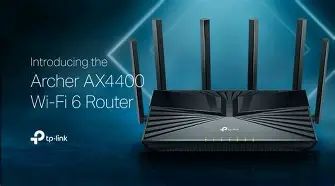
The Archer AX4400 uses a low, horizontal chassis with six external antennas. The physical layout favors easy placement on a shelf or desk and provides straightforward access to ports and LEDs. Internally it runs a relatively capable SoC (manufacturer materials list a multi‑core CPU) and includes a single USB 3.0 port for networked storage or media sharing. Wired connectivity is typical for this class: one Gigabit WAN and four Gigabit LAN ports. The build is utilitarian rather than premium, prioritizing functionality over flashy aesthetics.
Wireless performance (real‑world)
Raw maximum numbers—roughly 574 Mbps on 2.4 GHz and up to about 3,800 Mbps on 5 GHz—reflect theoretical ceilings rather than everyday throughput. In practical home environments the AX4400 shines where multiple devices are active simultaneously. Thanks to OFDMA and MU‑MIMO it manages small upstream/downstream packets to many devices more efficiently than older routers. For a household running 4K/8K streaming, frequent video calls, cloud backups, and smart‑home traffic, the AX4400 reduces contention and maintains snappier responsiveness.
Single‑client top speed at a short range on the 5 GHz radio will depend on client Wi‑Fi 6 support and the client’s antenna count. Expect the best results with modern laptops and phones that support Wi‑Fi 6 and 160 MHz channel widths; older or single‑stream devices will see smaller but still meaningful gains over Wi‑Fi 5 hardware thanks to improved spectral efficiency.
Coverage and range
The six external antennas and beamforming help the AX4400 provide consistent coverage across a medium to large home. Walls, floors, and RF interference always shape performance, but typical two‑story homes will generally get good main‑floor and upstairs coverage. For very large homes or unusual floor plans, the AX4400 works well as the primary node in a OneMesh setup with extenders to create a single SSID and seamless roaming.
Feature set and firmware
TP‑Link equips the AX4400 with its HomeShield suite (subscription tiers may apply for advanced features), which bundles basic network security, parental controls, and device‑level management. Parental controls allow scheduling, content filtering, and time limits by device or user profile, useful for families who want to manage screen time and web access. The router supports WPA3 for improved encryption on compatible devices and includes guest Wi‑Fi networks for both bands.
Looking for the best Electronics deals on Amazon?
Browse Now →For users who prefer mobile setup and management, TP‑Link’s Tether app provides guided installation and ongoing control. More advanced users can use the web management interface for granular settings, QoS rules, VLANs on some firmware versions, and port forwarding. OneMesh compatibility is a practical advantage if there is an intent to scale coverage without migrating to a whole‑home mesh subscription or different vendor ecosystem.
Gaming, streaming, and multi‑device households
For gamers, the AX4400 offers low latency under load because Wi‑Fi 6 reduces airtime contention when many clients are active. The router does not replace a wired gaming setup for the most competitive players, but for console gaming and latency‑sensitive streaming it performs very well. Streamers and households that simultaneously run multiple 4K streams will benefit from the larger 5 GHz capacity—so long as upstream ISP bandwidth is sufficient and many devices are Wi‑Fi 6 capable.
Wired performance and expandability
All LAN ports are Gigabit, which matches most consumer internet connections and local network needs. The single USB 3.0 port is handy for file sharing and basic media serving, but it does not replace a dedicated NAS for heavy multi‑user file services or advanced RAID setups. There is no multi‑gig WAN or LAN port on most AX4400 retail revisions, so users with 2.5G or 10G home networks should consider higher‑end models.
Security and privacy
WPA3 support, automatic firmware updates (if enabled), and HomeShield tools make the AX4400 reasonably secure out of the box. Buyers should enable strong admin passwords, keep firmware current, and review any subscription features in HomeShield if privacy‑sensitive data is involved. For small businesses handling regulated data, a router with enterprise‑grade logging and VPN concentrator features may be preferable.
Setup and user experience
Setup via the app or web interface is straightforward. TP‑Link’s onboarding walks through WAN configuration, SSID naming, and optional HomeShield enrollment. Nontechnical users will appreciate the simple defaults: a secured Wi‑Fi network and a usable guest network are ready to go, while power users can dive into advanced settings. Overall, the balance of simplicity and depth is well executed for a mainstream consumer device.
Pros & Cons
- Pros:
- Modern Wi‑Fi 6 features (OFDMA, MU‑MIMO, 1024‑QAM) for improved multi‑device performance
- Strong 5 GHz capacity suited for high‑definition streaming and many simultaneous devices
- OneMesh compatibility for scalable coverage without replacing the router
- Comprehensive parental controls and basic security through HomeShield
- Easy setup with TP‑Link Tether app and a usable web interface for advanced configuration
- Cons:
- No multi‑gig LAN/WAN ports for users with >1 Gbps local networking needs
- USB 3.0 port suitable for light network sharing but not a substitute for a dedicated NAS
- Some advanced security or logging features are gated behind subscription tiers in HomeShield
- Design and build are functional but not premium compared with higher‑end models
How the Archer AX4400 compares (compact table)
| Model | Wi‑Fi Standard | Max Combined Speed | Bands | LAN Ports | USB | Mesh Support | Best for |
|---|---|---|---|---|---|---|---|
| Archer AX4400 | Wi‑Fi 6 (802.11ax) | ~4400 Mbps | Dual (2.4 + 5 GHz) | 4 × Gigabit LAN | 1 × USB 3.0 | OneMesh | Medium‑to‑large homes with many devices (streaming + gaming) |
| Archer AX55 (AX3000) | Wi‑Fi 6 | ~3000 Mbps | Dual | 4 × Gigabit LAN | None/USB 2.0 (varies) | OneMesh | Smaller homes or budget-conscious buyers wanting Wi‑Fi 6 |
| Archer AX6000 (higher tier) | Wi‑Fi 6 | ~6000 Mbps | Dual | 8 × Gigabit LAN (or mixed multi‑gig in other high‑end models) | 1 × USB 3.0 | OneMesh | Larger homes, heavy local networks, users needing higher wired throughput |
Real‑world use cases: who benefits most
The AX4400 is most compelling in these scenarios:
Looking for the best Electronics deals on Amazon?
Browse Now →- Busy family homes: Multiple phones, tablets, multiple HD/4K streams, and smart devices all active—Wi‑Fi 6 helps reduce congestion and maintain responsiveness for video calls and multiplayer games.
- Hybrid work households: One or more people working from home with VPNs, video conferencing, and cloud backups while others stream or game.
- Apartment or small house with strong ISP speeds: If the internet service delivers near‑gigabit speeds and client devices can use Wi‑Fi 6, the AX4400 helps deliver that bandwidth around the home.
- Owners wanting incremental mesh expansion: Users who plan to add TP‑Link OneMesh extenders will find it convenient to keep a single SSID and roam between nodes.
What buyers typically care about (and how the AX4400 stacks up)
When shopping for a router, buyers often focus on: coverage, speed, device‑handling, security, wired ports, and value for money. The Archer AX4400 addresses these as follows:
- Coverage: Good for medium to large homes; external antennas and beamforming improve reliability. For very large properties, pair with OneMesh extenders.
- Speed: Excellent 5 GHz capacity for modern devices; real‑world speeds depend on client hardware and ISP.
- Device handling: OFDMA and MU‑MIMO aid many concurrent devices, a clear step up from older routers for busy homes.
- Security: WPA3 and built‑in HomeShield features provide baseline protection; advanced security functions can be subscription‑based.
- Wired needs: Sufficient for most households with Gigabit internet; lacks multi‑gig ports for future‑proofed wired LAN upgrades.
- Value: The AX4400 often sits in the midrange Wi‑Fi 6 price band—priced above entry AX3000 models but below premium multi‑gig, multi‑band tri‑band routers.
Buying guide: how to decide if the Archer AX4400 is right
Use this checklist to match the router to specific needs:
- Home size and layout: If the living space is roughly up to a large single‑family home, the AX4400 will likely cover the main living areas. For sprawling homes or multiple detached structures, plan for additional mesh nodes or a higher‑end mesh system.
- Number of devices: If there are dozens of devices (phones, cameras, smart plugs, media players), Wi‑Fi 6’s efficiency matters and the AX4400 is a sensible choice.
- Internet speed: Match the router to ISP speed. If the household has sub‑300 Mbps service, a lower‑tier Wi‑Fi 6 router may be more cost‑effective; if the household approaches 1 Gbps, the AX4400 can better utilize that bandwidth over wireless.
- Wired performance needs: For heavy local file transfers, backups, or a multi‑gig home backbone, a router with 2.5G/10G ports is preferable—AX4400 does not target that niche.
- Future‑proofing: The router’s Wi‑Fi 6 feature set and OneMesh support provide a good balance of forward compatibility without the premium cost of enterprise hardware.
- Security and management: If out‑of‑the‑box parental controls and basic security are priorities, the AX4400’s HomeShield and Tether app are practical; if a business requires advanced logging and enterprise VPNs, consider a business‑grade appliance.
- Budget: Compare the AX4400 against cheaper Wi‑Fi 6 models (AX3000 class) and higher‑end models (AX6000+). If multi‑device performance and extra 5 GHz capacity matter, the AX4400 is often the middle ground in price vs. performance.
Conclusion: is the Archer AX4400 worth the price tag?
Value depends on the buyer’s priorities. For a family or household that juggles many simultaneous streams, remote work meetings, gaming, and an expanding smart‑home footprint, the Archer AX4400 offers meaningful real‑world improvements over previous‑generation routers. It hits a middle ground: substantially better multi‑device handling and higher 5 GHz capacity than entry‑level Wi‑Fi 6 models, without the premium hardware and multi‑gig wired ports of top‑tier routers.
If the household’s internet plan is modest (well under 300 Mbps), or if wired multi‑gig throughput and enterprise features are required, another router may be a better fit. For most typical consumers looking to upgrade aging Wi‑Fi 5 equipment, the AX4400 is a practical, well‑rounded choice that balances features, performance, and ease of use. In short: it is worth the price tag for users who will actually use the higher wireless capacity and multi‑device improvements; for buyers with simpler needs, a lower‑cost Wi‑Fi 6 model can deliver much of the benefit for less money.